Scan QR Code
Scan Your Water Passport
Point your camera at the QR code on any MiMaji bottle to instantly see where your water comes from, lab test results, and verification status.
Camera scanning launches with our next update
No bottle to scan yet?
Order today to get started. Every MiMaji bottle arrives with a unique QR code that links you to its full Water Passport — vendor, source, lab test results, and KEBS certification.
Order Your First Jug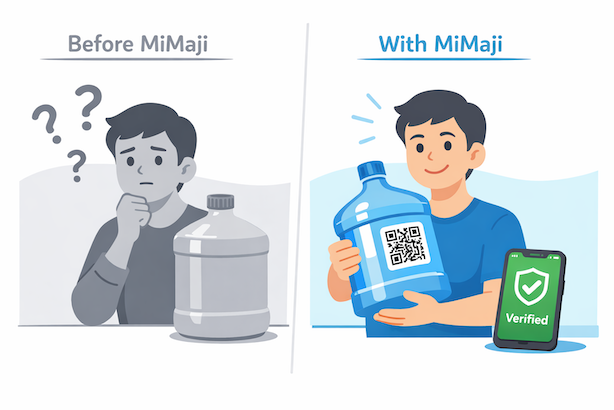
How scanning will work
Find the QR sticker
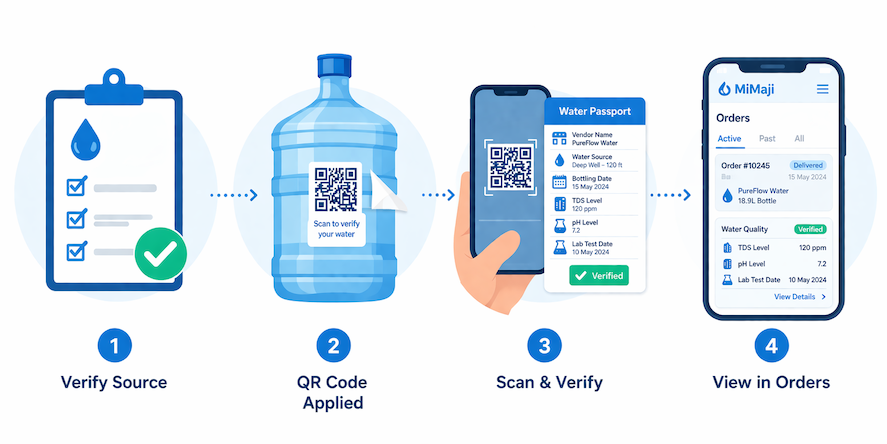
Every MiMaji jug and bottle carries a branded QR sticker on the label.
Tap to open camera
Use the button above to launch your phone's camera and point it at the code.
See your Water Passport
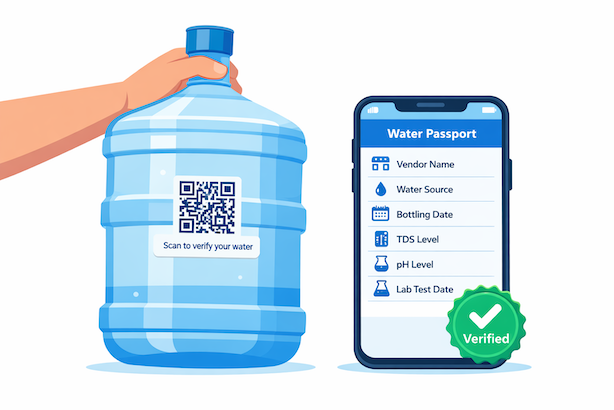
Vendor, source, bottling date, TDS, pH, lab test, and KEBS status appear instantly.
What you'll see in the app
After a scan, the MiMaji Water Passport opens and shows the vendor, water source, lab test results, and KEBS certification for that specific jug.
Already ordered from MiMaji?
Your water quality information is already available inside the app. Check any recent order to see the full Water Passport — no scanning required.
View My Orders →Want to learn more?
Read how MiMaji verifies every vendor on our platform and why we built the Water Passport system.
Read: Know Your WaterScan Your Water Passport
Point your camera at the QR code on any MiMaji bottle to instantly see where your water comes from, lab test results, and verification status.
Camera scanning launches with our next update
No bottle to scan yet?
Order today to get started. Every MiMaji bottle arrives with a unique QR code that links you to its full Water Passport — vendor, source, lab test results, and KEBS certification.
Order Your First JugHow scanning will work
Find the QR sticker
Every MiMaji jug and bottle carries a branded QR sticker on the label.
Tap to open camera
Use the button above to launch your phone's camera and point it at the code.
See your Water Passport
Vendor, source, bottling date, TDS, pH, lab test, and KEBS status appear instantly.
What you'll see in the app
After a scan, the MiMaji Water Passport opens and shows the vendor, water source, lab test results, and KEBS certification for that specific jug.
Already ordered from MiMaji?
Your water quality information is already available inside the app. Check any recent order to see the full Water Passport — no scanning required.
View My Orders →Want to learn more?
Read how MiMaji verifies every vendor on our platform and why we built the Water Passport system.
Read: Know Your Water